What Does Collate Mean When Printing?
When you are printing multiple-page documents, you can see an option in the printing settings that is known as collate. But how can you simply understand what collate actually means?
We will define simply for your understanding: Collate means to organize your printed papers in correct or arranged order. With this technique, you can ensure that multi-page documents are complete or properly aligned.
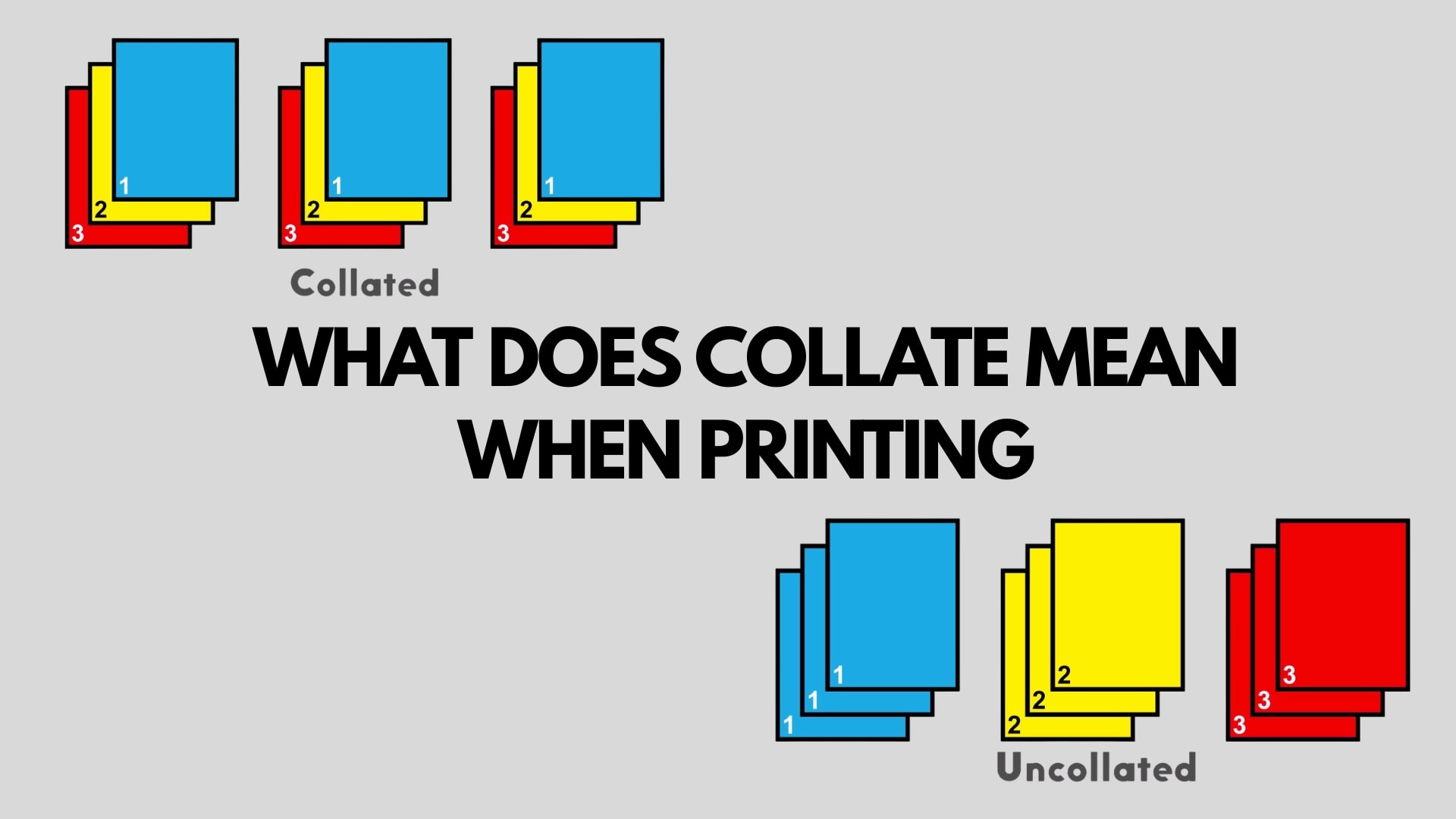
Example: If you print multiple copies with collation enabled, the printing of pages 1, 2 and 3 will be produced in the sequence:
Copy 1: Pages 1, 2, 3
Copy 2: Pages 1, 2, 3
Copy 3: Pages 1, 2, 3
That means each copy from start to end is printed in full sequence order, which makes it easy to use or collect.
If you do not select the collation before printing, the printer prints all copies of pages combined.
Example:
All copies of Page 1
All copies of Page 2
All copies of Page 3
In this case, it takes you time to arrange the pages after printing. So if you do not want to waste your valuable time, select the collate option before printing.
You can also use the collating process to print your different documents, like reports, booklets, or different files, where you have no issue correcting the sequence of pages in order. Because collating ensures that pages are ready for their purposes, like binding or distribution.
Definition Of Collate For Simple Understanding
Collate means to gather pages or information in a proper order. You can collect information in different forms, like data, text, or documents. It is an easy-to-use and time-efficient option. You can use the collate option to avoid extra effort after printing.
What Is Collated Printing?
We can easily understand collate printing after understanding the meaning of collate. Collate or collate printing are the same thing. But in simple words, we can say that collate printing is the process by which we can print multiple copies of a document in a sequential order. You do not need to arrange any documents after the collate printing option.
When the collate option is selected once, the printer analyzes multiple documents or prints each set completely in an organized order. In easy words, documents come out in a sequence as full sets or fully ready to use. If you have not selected the collation before printing all documents come in combined form, and you need to arrange them to save time or effort.
Collate Printing Examples
A 20-page training manual:
With collated printing, all 20 pages come in the correct order.
A 50-page research report:
All 50-pages arranged in a sequence to make it easy to read or understand.
A set of 100 invitations:
Each set is arranged properly according to all required parts.
What Collate Does In Printing?
The collate option in printing gives you some advantages that are given below:
Sequential Organization
It prints your documents in proper sequence, which helps you avoid manual sorting or extra effort after printing.
Efficient Workflow
If you are working on large-scale projects, it is efficient for you. You can easily read your reports, booklets, or different presentations without extra effort.
Time-Saving
It saves time, or also removes the human sorting needed after the printer finishes.
Difference Between Collated and Uncollated Printing
Collated prints are totally different from each other. They are opposite; in collated printing, pages are arranged in the correct order, but in uncollated printing, documents of pages are not arranged properly or printed in the form of groups of the same page.
Example: For your understanding, you can assume that if you are printing a document of pages-5 without selecting the option to collate, the pages will print in a different order, like: 111, 222, 333, 444, 555.
This means that all copies of documents are not arranged in a sequence, or page 1 is printed first in all files, then 2, and so on. So if you do not have this option, you need to arrange all your files after printing, which can be difficult.
How To Collate On Your Printer?
If you have no idea how to select the collate option before printing. Don’t worry, we are here to assist you. We will guide you properly on how to collate on your printer. When you print a document or any file, the collate option in the print is usually selected by default. But you have to recheck.
It is necessary to collect your important files in an organized way. In the print preview or the dialogue box that comes when you click the print option, you can easily find the collate option.
The location of this option also depends on your software. Because every software has its own functions or features. But the collate option usually appears on most software when you select multiple copies for printing.
Example: When you print multiple files, like PDF or different documents, the collate options appear here. So you can easily select these options to arrange your documents.
What Does Manual Or Offline Collation Mean?
Manual and collation are both different terms. Offline collation means arranging your documents or printed pages after printing. It can also be done manually with the help of machines.
Manual collation means simply putting pages by hand into a printer in the correct order. If you are printing a document that has similar types of pages, automated collation will be the best option. It makes your work easier. But if you are printing different types of documents like business cards or different product catalogues, manual collation will be the best or most suitable option.
You also may need a different print run in some cases. For example, one set of pages can be printed on one type of paper, but another needs a different type of paper. These sets can be separated by collated options, but sometimes special pages need to be manually arranged.
This example shows that for different chapters, we need printed dividers. Special pages need manual arrangement in the document.
But in this modern era of technology, many software programs in the market also allow us to control how paper is pulled from different trays during printing. That is really helpful in organizing complex documents. Once you understand how to use collation, it will make your printing work easier or more efficient.
How Can Perfect Colors Help In Understanding?
If you are still confused about collating or printing, perfect colors can help you. They play a role like specialists in large-format printing and have a great knowledge of printers. If you have any confusion, you can consult an expert team for your printing needs.
Benefits Of Collating For Printing
Collating before printing gives you a lot of benefits. It is a time-saving mechanism that saves your time, and you have no need to rearrange pages after this process. It is also beneficial for your business and your personal work.
It is also helpful whenever you print booklets, guides, PDF documents, or leaflets. They come in the correct order, which reduces the stapling or extra bindings. So if you are printing multi-page documents, it is the best and most beneficial way for you.
We can also understand the benefits of collating for printing with some examples. If we print a booklet, it requires pages that are fully arranged so the reader can easily read the topic or information in the sequence. Teachers or students also use collated printing for their works. Students use this technique to submit their research report in an organized way, or teachers use this method to make notes for students in a sequential order. We also use collated printing to print brochures, books, and calendars. You can use collated printing for arranging the printed pages or for different purposes.
Why Is Collation Important Before Printing?
In this era, people want their lives to be easier and believe in smart work rather than hard work. As it was in the past, people arranged their papers after printing, but in this modern era, collation printing does it automatically. IT is also important due to three main reasons:
In the past, people had to manually arrange pages after printing. But now, printers can do this automatically. The process of arranging multiple documents is easier with collate printing, such as:
Convenience
It is convenient and easy to use for the orderly arrangement of multiple pages. After printing, the pages are arranged properly and ready to use.
Accuracy
With collated printing and packaging, you can ensure the accuracy of your documents. It reduces extra mistakes or mixing.
Effortless or Constant Work Flow
With no effort, you can continue printing multiple pages or copies in a better way. It makes your workflow constant or easier.
How Collate Printing Helps In Packaging?
Collated printing helps in packaging in different ways. It ensures multiple things like multi-page inserts, manuals, or box panels in the sequential order. It reduces errors, eliminates manual sorting, enhances efficiency, or provides ready-to-use sets. So if you want to make your manufacturing box process easier without any errors, you can use collate printing.
Some common uses of collated document printing and packaging are given below:
Brand Logo and User Manuals
You can make your brand logo and user manuals more efficient by collating them in the packaging.
Instruction Copy Within Each Packaging Box
In pharmaceuticals, instruction papers are mostly used, which can be printed efficiently with the collate printing technique. So, you have no need to manually collate every document for each box.
Kids' Toys Manuals
Collate printing is also used to make packaging for kids, like jigsaws and puzzle packaging. With collating printing is a game-changer technique; with collating, you can save time without any error that helps you build your place in the market.
Commercial Printing (Retail Packaging)
You can use collate printing for different projects, like large retail orders for packaging. It works with complete accuracy, which brings customer satisfaction.
What Type of Printers Support Collate Settings
In this modern era, computers or printers are designed according to the market trends that allow collating settings. They are specially made according to the business-related work, which not only saves time but also provides error-free work. Setting on resembles it automatically collates when you print any type of document.
If you are looking for some printers that help you in packaging stuff or work faster, we have some suggestions. You can choose these options for collate printing that are perfect for startups or small businesses.
Inkjet printer
IM 350/430 printers
Xerox B215 Multifunction Printers
HP LaserJet Enterprise MFPs
You can also check various models from Ricoh, Brother, or other manufacturers that all support collate features.
Commonly Used Collating In Different Cases
When you explain collates, it sounds obvious. Why is this option essential to arrange our document? There are thousands of questions in your mind that create a mess. To answer your every question, we will tell you about how collates are commonly used in our workplace and why it is essential. Let's discuss the value of collating with some examples in the workplace:
Print Reports
In print routes, collating is used to collect copies in a specific sequence. It makes your work easy. You can easily align your reports without any extra struggle.
Presentations
In a presentation, you can use Collate to set your slides or arranged in the intended order. It makes your communication effective or leaves a lasting impression.
Manuals, instructions, and guides
It helps to deliver a logical sequence of pages in manuals, instructions, or guides. It helps in understanding different procedures.
Invoices, Statements, & Billing Documents
Collate printing refers to making sure the information will be printed in a coherent or organized way that makes it convenient.
How To Enable Or Disable Collating?
The enabling or disabling depends upon the printer software or the client’s operating system. If you want to enable or disable clotting, you can do it by going into the settings of the print dialogue box.
When you open settings, you can see the collate option. If you want to enable it, turn on the option for disabling. Turn off the option. You can also check the Google websites for more instructions or guidelines.
When Should You Print Collated?
You should use collated printing in some situations:
When Printing Several Multi-page A4 Documents For A Meeting
Collated printing helps you to save your time after printing, when you need to arrange the papers by hand. It ensures your documents for meetings are free from human errors or mistakes, which is why it aligns documents without any mistakes.
Example:
If you print your documents 20 times or you have to share a copy of this document with 20 people, it frustrates you to arrange the documents again and again after printing. With collate printing, you do not need to arrange your 20 documents again and again; they will align, that save you from being frustrated or needing more effort.
If You Plan To Bind Pages Together By Using A Binding Machine Or Manually
If you are thinking about arranging your documents manually or with a binding machine, consider collating printing to resolve your problem. You can combine documents in a specific way with collated printing without any effort. It makes your work quicker.
Example:
If you want multiple copies and a document that has five pages, collating can help. It enables pages in order like 1, 2, 3, 4, and 5, then repeat it again and again according to your requirements or copy with perfect arrangement.
If Your Ink Or Toner Is Running Low
If you are printing, and once the ink or toner cartridges run out, you need to start the print again if you won’t complete your document. If you are not selecting the collated option, you cannot print yet. Collated printing options resolve your problem or make your document completely print even when toner or ink is running low between processes.
If You Are In A Hurry
If you are in a hurry or don't have time to arrange your documents after printing, select the collated option. It is time efficient that saves your time or hard work.
Several Ways To Collate Documents
Collating is done through several components or in different ways. The printing is created by online and offline collation. Online collation occurs through a segregation after the components have been printed, or offline collation occurs through removal from the press.
It depends on the project. You can use offline collation for a manual operation.
If the documents are set within a piece or given similar data in it, you can use this process of collation with an automated piece of equipment.
Some documents, like a saddle-stitched product catalog, a dozen multi-part orders, and a business card, cannot be done with automated collation; it requires collating by hand.
Tips For Successful Collated Printing
Here are some tips for your ease in successful printing:
Check Your Settings
Check your settings before starting any project that collation is enabled with your software or not.
Label Files Clearly
Label your files clearly in sequence to keep everything in order, like a PDF. Page 1. It orders your files or helps you to find your documents easily.
Rearrange Pages Easily
Mixam’s Artwork helps you to drag the pages of files in a specific order, even if you have already uploaded your document. With this, you can manage your document easily.
Design Online
By using Mixam's free design online tool, you can handle collation automatically. Just include a range of customization options in the file for proper sequential order.
Ask For Help
In case of any confusion, you can contact our printing experts. They will guide you properly without demanding any extra charges.
Why Do You Need To Know All This?
AT Packaging Hippo, we want to make our customers' work easier. That's why we want to give you knowledge about different printing techniques to make your work professional and efficient. If you want to learn and want to make your printing process easier, you can consult our dedicated team. We will help you to learn print management simply.
Packaging Hippo Your Partner For Managed Print Services
Once you choose Packaging Hippo, you can get Client Service Specialists (CSSs) who are knowledgeable about printing techniques. So, in case of any confusion or need for some suggestions, our CSSs are ready to assist you. No matter if you need help in the form of written instructions or a recorded video, they will assist you properly. Their suggestions help you in business productivity.
If you want to learn about multifunction printers or want to save your money, this guide will help you. Contact us at Packaging Hippo now!
FAQ’s
Collation remains the same or double-sided?
No collation refers to the arrangement of papers. Double-sided rate for the use of double-sided paper.
Where can I select the collate printing option?
You can select collate printing options from the settings. You can also enable this option when your document is ready to print or select a print option.
Is it costly?
No, it is not costly because it does not demand extra ink or paper. It simply changes the order or arranges the papers according to the document or file.
Do I have to collate pages on a printer?
It's your choice. It's an option, not a default setting. If you want to save your time or arrange the document without any effort, you can choose the collate printing option.
What happens if I don’t collate?
If you don’t select a collate option, you have to arrange your documents by hand, which can be hard for you if you have a large file.
When is collate printing useful?
Colored printing is useful when you are in a hurry and have no time to arrange your documents.
Conclusion
Printing with collate is the best option, as it helps you to correct the order of pages without any extra effort. Different multifunction or modern printers have collate options to help print collated pages in the correct sequence. If the collate option is active during printing, the copies of the pages will not exceed.
Collating is beneficial, or better than manual collating. This helps in ritual packaging to customize or print boxes in the correct sequence order with 100% accuracy. You can use the uncollated option when you need single-page copies, but if you want to copy multiple documents in the correct order, collated printing is the best option.

Written by Mehak Alvida
Researcher & Senior Writer
She is a dedicated content writer in the custom packaging industry, specializing in creating engaging, creative, and informative content that highlights innovative packaging solutions. Through continuous learning and practice, she produces valuable content that enhances packaging strategies, improves product presentation, and strengthens brand identity. Her work aims to provide insightful perspectives that help businesses stand out in the competitive market.

Need Custom Packaging Solutions?
Get a personalized quote for your business today. Our experts are ready to help.